
Every article on the net has have their own address. When you type it in your browser, you will access to the exact same page no matter where your location is. This unique address is also known as permalink or URL. By default, WordPress will use the ugly format for the permalink, as shown below:
http://yourdomain.com/?129
This is not a user-friendly permalink and looks ugly. Really.
In WordPress, this is really easy to change. For example, you might one something that easy to remember and SEO-friendly like below:
http://yourdomain.com/wordpress-tips/
To change the default permalink, just follow these simple steps:
1. In your dashboard, hover on Settings link and click on the Permalink link.

2. In the permalink settings page, you will see the default format for permalink as shown below. You may also choose another format as well.
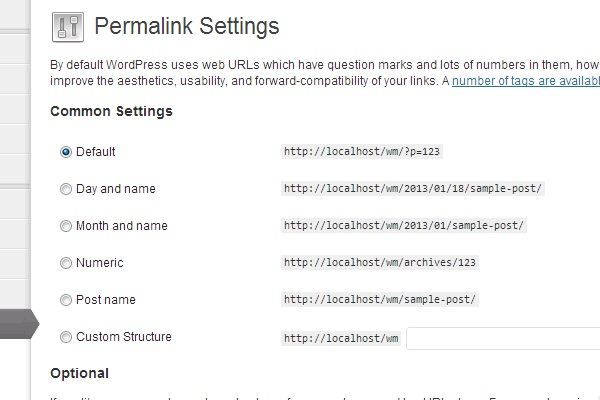
3. To change it, tick on the Post Name format for the permalink.

4. Hit the Save Changes button at the bottom of the page. Congratulations, you’ve successfully changed your permalink!
Discussion