How to Sync Stock & Price for WooCommerce Products
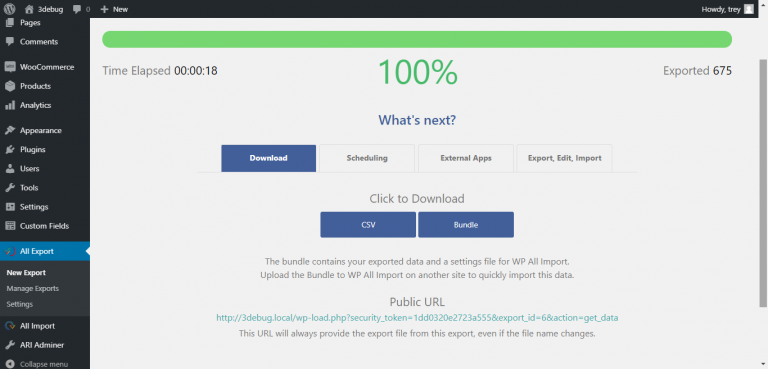
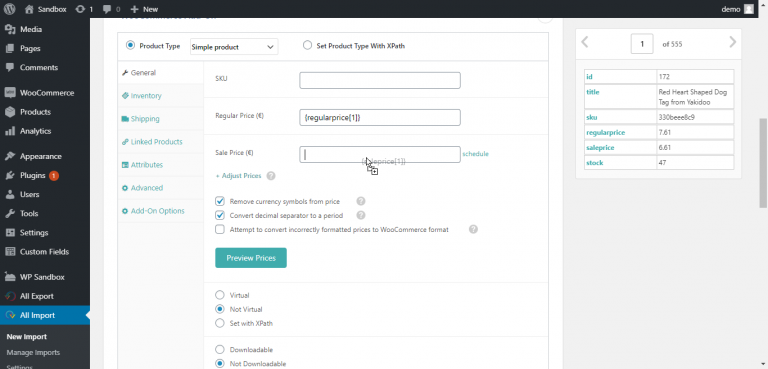
First, upload any CSV or XML to WP All Import. Then drag & drop to link the stock/price data from your file to…
Read articleFirst, upload any CSV or XML to WP All Import. Then drag & drop to link the stock/price data from your file to…
Read articleFirst, export your WooCommerce Customers to CSV with WP All Export. Select Migrate Customers to set up your export automatically. Then upload them…
Read articleYou can import WooCommerce Products from any file with WP All Import: Create a new import and select WooCommerce Products Drag & drop…
Read articleCreate a new export in WP All Export and select “WooCommerce Orders” from the drop-down, then drag & drop the order data to…
Read articleEvery business website and blogs need a contact form. It will help the customers to get in touch with you, clear the doubts…
Read articleIf you are working with WordPress for a while, you know the MonsterInsights WordPress plugin. It is one of the popular WordPress plugins…
Read articleWhen Facebook announced they just bought WhatsApp app for $19 billion a few months ago, you know there must be a reason behind…
Read articleWhenever you register a new account on a site, most of the time you’ll see a checkbox asking you to agree to terms…
Read article