Previously, we’ve shown several ways on how to embed Instagram images in your WordPress site. Recently, Instagram added a new feature that allows users to take a short video with some cools filters. That’s pretty awesome. Therefore, I believe some bloggers are looking to embed their cool video in their site. In this article, we’ll show you how to embed Instagram video in WordPress.
Firstly, you need to open the video single page. Then, look at the bottom right of your screen where you’ll see a button with three dots on it. Click it and choose the Embed option.
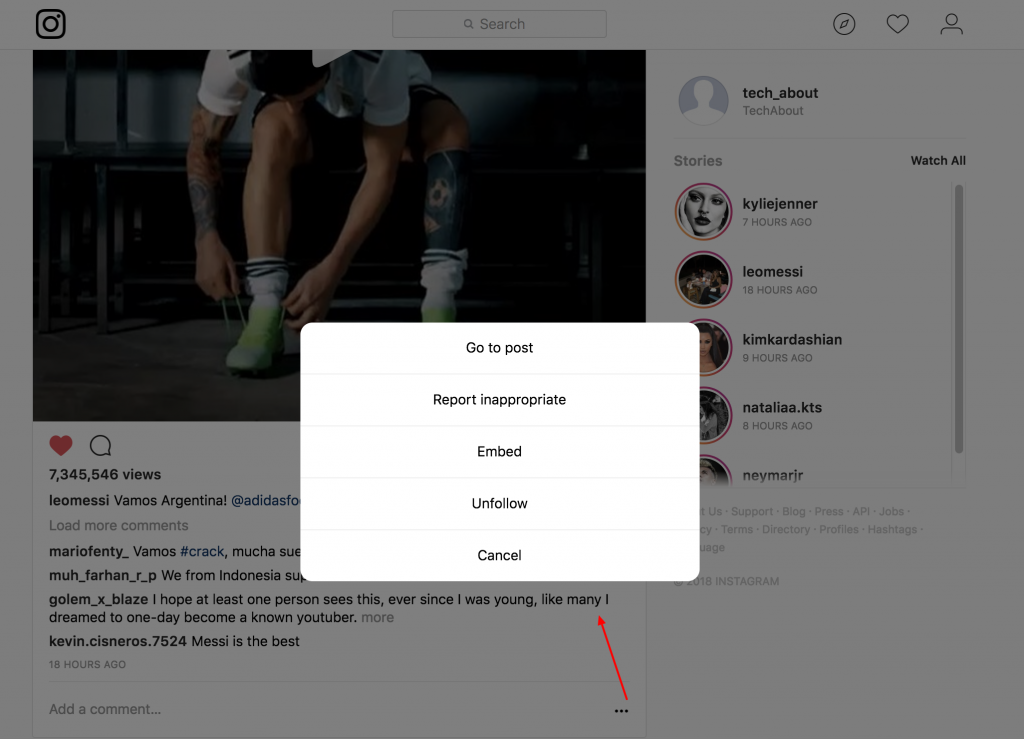
Then, copy the embed code and paste it in your post or page.

Here’s an example of video from leomessi:
That’s it. The video feature was just introduced and we found it a little bit buggy. For example, in some browsers, the video isn’t working. If that’s the case, you might want to try it from another browser. Moreover, currently WordPress does not support Instagram video in it’s auto-embed feature.
Discussion