• Skip to primary navigation
  • Skip to main content
  • Skip to primary sidebar
WPFeed

WPFeed

  • News
  • Tutorials
    • WordPress Multisite
    • BuddyPress
    • Design
  • Reviews
    • Plugins
  • Roundups
  • Snippets
  • Giveaways
You are here: Home / Plugins / How to Add Comment Status Submenu in WordPress Dashboard

How to Add Comment Status Submenu in WordPress Dashboard

It’s a little frustration that WordPress does not add a submenu of comment status in your WordPress dashboard.

Although it shows a notification of new comment status, there are still few more steps. You need to click on it, then click on the comment status (like shown below):
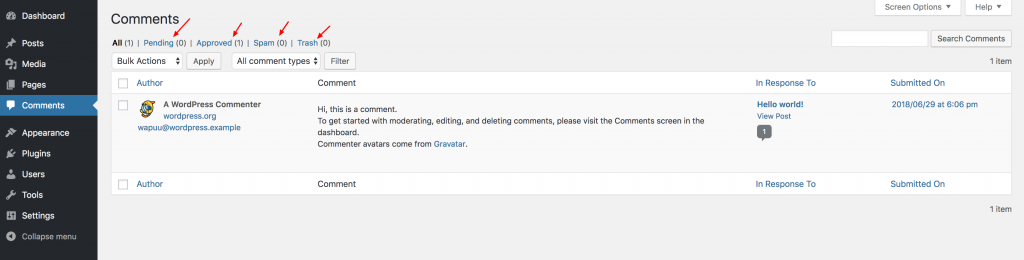
pending-comments

To add the comment status submenu, simply install and activate Comment Menu Links plugin. This plugin works out of the box and will add 4 new submenu under Comments menu:

  • Approved
  • Pending
  • Spam
  • Trash

Once activated the plugin, this is what you’ll see:

comment-status-submenu

Update: Pippin Williamson, the author of this plugin has written a complete tutorial on adding this feature to your WordPress site without plugin.

Reader Interactions

Leave a Reply Cancel reply

Your email address will not be published. Required fields are marked *

Primary Sidebar

Recent Posts

  • WPArena.com Case Study
  • Great Stuff for WordPress Powered websites
  • How to Sync Stock & Price for WooCommerce Products
  • How to migrate a WooCommerce Store to a new site
  • How to Import WooCommerce Products

Copyright © 2026 · WPFeed.com - A Project of TechAbout LLC.

  • About us
  • Advertise
  • Write for us
  • Terms and Conditions
  • Privacy Policy
  • Contact us